
If an idea or another entity was moved to the wrong state by mistake, it can be manually moved back to the required state.
There are two ways to do this, depending on whether you want the configured notifications related to the state transition to be triggered.
Notes:
- The person that performed the transition, might not have the permission to reverse his/her decision as explained here.
In such cases, please contact the sysadmin/subsystem admin who can always perform all transitions. - If the transition was made due to an auto transition rule, you need first to understand what the rule is, make sure it will not be triggered again (by editing the idea), and only then move the idea back to the original state.
- If the entity was deleted by mistake, please contact the Qmarkets Support Team for assistance.
Option 1: Change the State Using the Process Icon
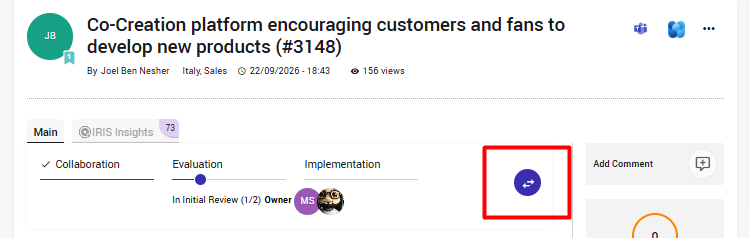
The simplest way is to change the state directly from the entity page.
An authorized user, such as a SysAdmin, Campaign Manager, or State Owner, can:
- Open the relevant entity.
- Click the Process icon.
- Select the required state and perform the transition.
Please note: If email notifications are configured for the selected state, they may be triggered again when the entity is moved back to that state.
Option 2: Change the State Without Sending Notifications
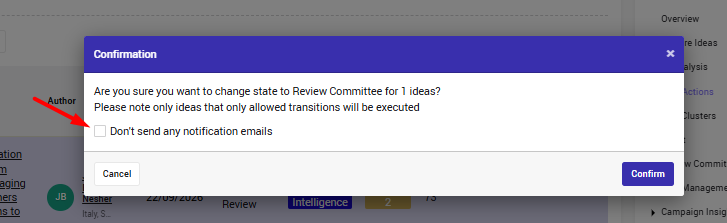
If you do not want the notifications to be sent again, perform the state change from the Bulk Operations page instead, who is available from the campaignpiagn menu.
- Go to the "Bulk Actions" page
- Find and select the relevant entity.
- Select the "Change State" option and then choose the required target state.
- Disable the notifications using the relevant checkbox.
- Apply the change.
This allows you to move the entity to the required state without triggering the configured notifications again.
See more inf ore how to use the bulk actions in this video
CS Tip:
We recommend informing the author(s) and any relevant stakeholders that the entity was moved to the wrong state by mistake.