
An ongoing user provisioning is crucial in order to make sure all and only relevant users exist in the system with the correct profile information, permissions and more.
We recommend performing this on daily/weekly basis for continuous updates.
The preferred user provisioning method is SCIM, but in in case it's not doable by the customer, Qmarkets also supports doing it via CSV file.
Users’ information would be sent via a CSV file generated by your organization and delivered to the application via a secured SFTP directory.
The file should include all active users. Users that do not exist in the file will be automatically blocked.
The following are the CSV file requirements:
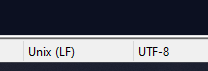
- UTF-8 format.
- Unix Encoded.
- csv or CSV file extension
- The first row should be used for the columns’ headers (column header = user’s profile filed).
- Users’ content should start from the second row.
- There should not be any values in extra rows or columns beside the actual content.
- Mandatory fields are username, email address & full name.
- Every user should have a unique username and a unique email address in separate columns.
- Each user’s attribute should be in a separate column.
- ‘- -‘chars are not allowed.
- Backslash ‘\’ not allowed.
- Tilda ‘~’ is not allowed (for example: ñ)
- Emojis are not allowed.
- Missing users from the file will be blocked in the system (unless otherwise requested).
Example CSV:

In case you would like to upload an encrypted CSV file - please review this article.